Introduction: The Brutal Reality of LinkedIn in 2026
You don’t have minutes to impress a recruiter.
You barely have seconds.
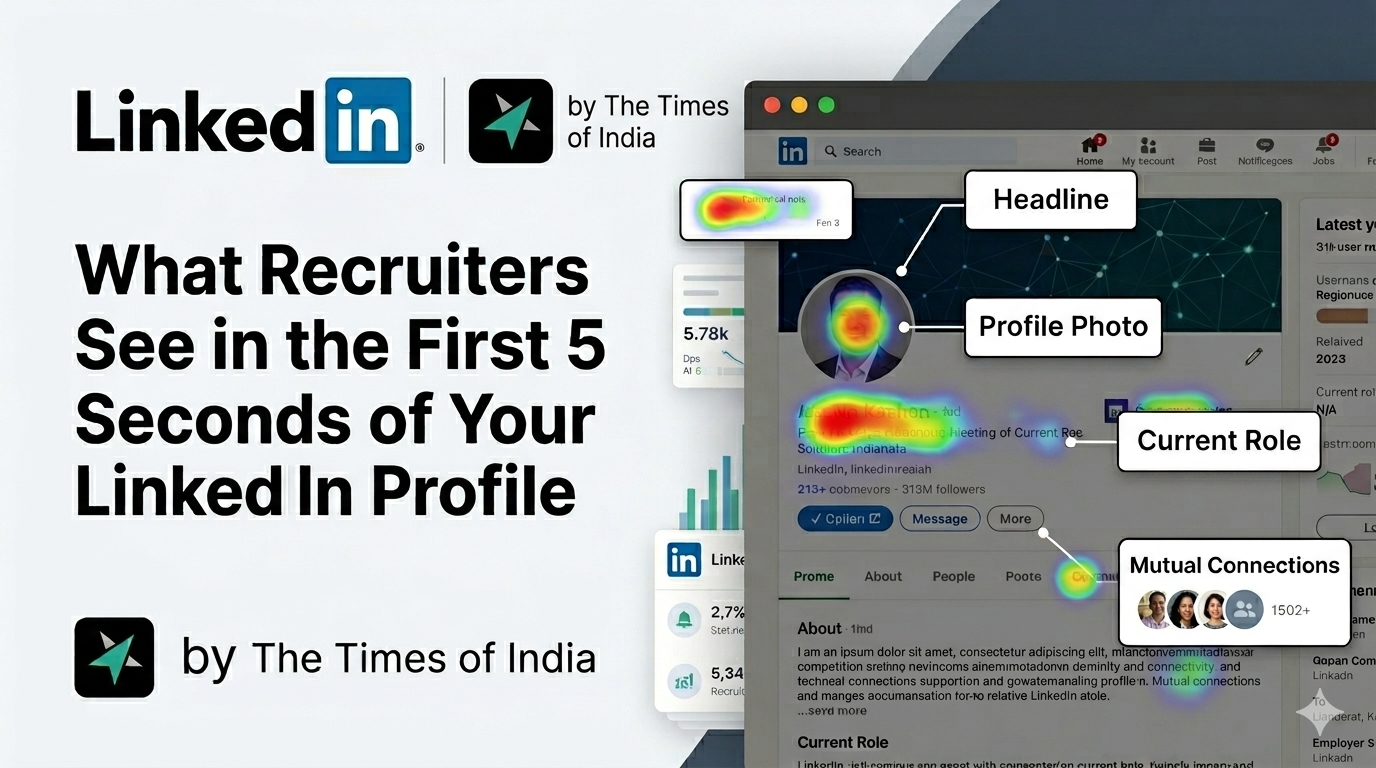
Multiple studies and recruiter insights show that hiring managers ‘scan not read’ your LinkedIn profile in under 5–10 seconds before deciding whether to continue or move on. In fact, eye-tracking research suggests that 73% of recruiters form an initial opinion in just 3.2 seconds.
Another report highlights that 86% of recruiters screen profiles within 30 seconds or less .
That means your LinkedIn profile isn’t a document, it’s a landing page. And like any landing page, it either converts… or gets ignored.
So what exactly are recruiters scanning in those first 5 seconds?
Let’s break it down.
The 5-Second LinkedIn Scan: What Actually Happens
Recruiters follow a predictable mental checklist. According to hiring experts, they are subconsciously answering three questions almost instantly:
- What do you do?
- Are you credible?
- Do you fit this role?
If your profile doesn’t answer these instantly, you lose.
1. Profile Photo: Your First Impression Happens Before Words
Before a recruiter reads anything, they see your face.
Your profile picture is processed in milliseconds and heavily influences perception.
What recruiters look for:
- Professional appearance
- Clear face (not cropped, not blurry)
- Industry-appropriate look
- Approachability + confidence
Profiles without a photo are often considered incomplete and less trustworthy.
👉 SEO Tip:
Use keywords like professional LinkedIn profile photo, LinkedIn branding, and personal branding for job search in related content sections.
2. Headline: The Most Important SEO Real Estate on LinkedIn
Your headline is arguably the most important element of your LinkedIn profile.
Why?
Because LinkedIn works like a search engine, and your headline is one of the primary fields recruiters use to find candidates.
Recruiters look for:
- Job title
- Industry keywords
- Core skills
- Value proposition
Generic headlines like “Open to Work” fail because they don’t communicate value quickly.
Example (Bad vs Good):
❌ “Looking for Opportunities”
✅ “Digital Marketing Manager | SEO | Paid Ads | 3x ROI Growth”
👉 SEO Tip:
Include high-volume keywords like:
- SEO Specialist
- Data Analyst
- Product Manager
- Software Engineer
These match recruiter search queries.
3. Current Role & Company: Instant Credibility Check
Within seconds, recruiters scan:
- Your current job title
- Your company
- Your seniority level
This helps them quickly assess:
- Experience relevance
- Industry alignment
- Career level
Recruiters often check your last 1–2 roles first to determine fit.
4. Location: A Silent Deal-Breaker
Location is one of the fastest rejection filters.
Recruiters check:
- City / region
- Remote eligibility
- Visa/work authorization assumptions
If your location doesn’t align with the job, your profile might be skipped instantly.
5. Keywords: The Hidden Gatekeeper (LinkedIn SEO)
Before a recruiter even sees your profile, LinkedIn’s algorithm decides if you should appear in search results.
Recruiters search using keyword queries like:
- “React Developer JavaScript”
- “B2B SaaS Product Manager”
- “SEO Content Writer”
If your profile doesn’t contain these keywords, you simply won’t show up.
👉 This is why LinkedIn behaves like Google for jobs.
6. Skills Section: Quick Validation of Fit
Recruiters scan your skills in seconds to confirm:
- Technical alignment
- Industry expertise
- Relevance to job role
A focused, relevant skills list performs better than a long generic one.
7. Proof of Impact (NOT Responsibilities)
This is where most candidates fail.
Recruiters don’t care about what you were responsible for.
They care about what you achieved.
Example:
❌ “Managed social media accounts”
✅ “Increased engagement by 150% in 6 months”
Profiles with measurable impact stand out immediately.
8. Profile Clarity & Layout
Recruiters scan, not read.
If your profile is:
- Cluttered
- Wordy
- Poorly structured
…it creates friction and friction leads to rejection.
Clear formatting increases your chances of getting a deeper review.
9. Activity & Engagement Signals
LinkedIn is not just a resume, it’s a content platform.
Recruiters check:
- Recent posts
- Comments
- Thought leadership
- Consistency
An active profile signals:
- Industry awareness
- Professional engagement
- Up-to-date knowledge
Inactive profiles can feel outdated, even if your experience is strong.
Why LinkedIn Promotes This Behavior (Deep Insight)
Now comes the critical question:
👉 Why does LinkedIn encourage this “5-second scanning” behavior?
1. Volume Overload
Recruiters handle hundreds of profiles daily.
With massive competition (millions of job seekers globally), quick filtering becomes necessary.
2. LinkedIn as a Search Engine
LinkedIn’s algorithm is designed like Google:
- It ranks profiles based on keywords
- It prioritises relevance over completeness
- It rewards clarity and structure
This is why keyword optimisation is critical.
3. AI-Driven Hiring
LinkedIn is increasingly powered by AI.
- 59% of recruiters use AI tools to discover candidates
- AI scans profiles for patterns, not narratives
This reinforces:
👉 Short, keyword-rich, structured profiles win.
4. Attention Economy
Recruiters are users too and LinkedIn optimises for speed and engagement.
The platform encourages:
- Quick decisions
- Fast browsing
- Minimal friction
Which leads to:
👉 The 5-second scan culture.
The Psychology Behind Recruiter Decisions
Recruiters don’t “evaluate” profiles at first.
They pattern-match.
They’re asking:
- Does this look like what I need?
- Does this feel familiar?
- Does this match my search query?
If yes → deeper review
If no → scroll
🛠️ How to Optimise Your LinkedIn Profile (with OutSpark)
Knowing what to optimise is one thing, doing it effectively is another. OutSpark helps bridge that gap by turning your profile into a recruiter-friendly, high-visibility asset.
- Headline Optimisation: Adds high-volume keywords to improve search visibility
- Experience Upgrade: Converts responsibilities into measurable achievements
- SEO Enhancement: Aligns your profile with recruiter search queries
- Better Structure: Makes your profile clean, scannable, and impactful
In a platform where recruiters decide in seconds, OutSpark helps ensure your profile gets noticed and shortlisted.
Common Mistakes That Kill Your Profile in 5 Seconds
- ❌ Generic headline
- ❌ No profile photo
- ❌ No keywords
- ❌ Long paragraphs
- ❌ No measurable achievements
- ❌ Irrelevant experience
Future of LinkedIn Profiles (2026 and Beyond)
The future is clear:
- AI-driven hiring will increase
- Keyword optimisation will become more critical
- Personal branding will matter more than resumes
- Profiles will act like digital portfolios, not CVs
Final Thoughts
Your LinkedIn profile is not judged fairly.
It’s judged fast.
And in those first 5 seconds, recruiters decide whether you’re:
👉 Relevant
👉 Credible
👉 Worth their time
If your profile communicates these instantly, you win.
If not, you disappear.